
free
Google Meet
Manage, schedule and launch Google Meet calls from Pipedrive to streamline your sales communication.
Built by Pipedrive
(4227)
501 reviews
Loop Mobility SMS - Australia
by LOOP MOBILITY PTY LTD
Nurture my leads, Communicate with leads, Automate my pipeline and data, Manage my accounts, Support my customers
What Loop Mobility SMS Does
Loop Mobility SMS brings native SMS messaging directly into Pipedrive, allowing your team to communicate with leads and customers without leaving the CRM.
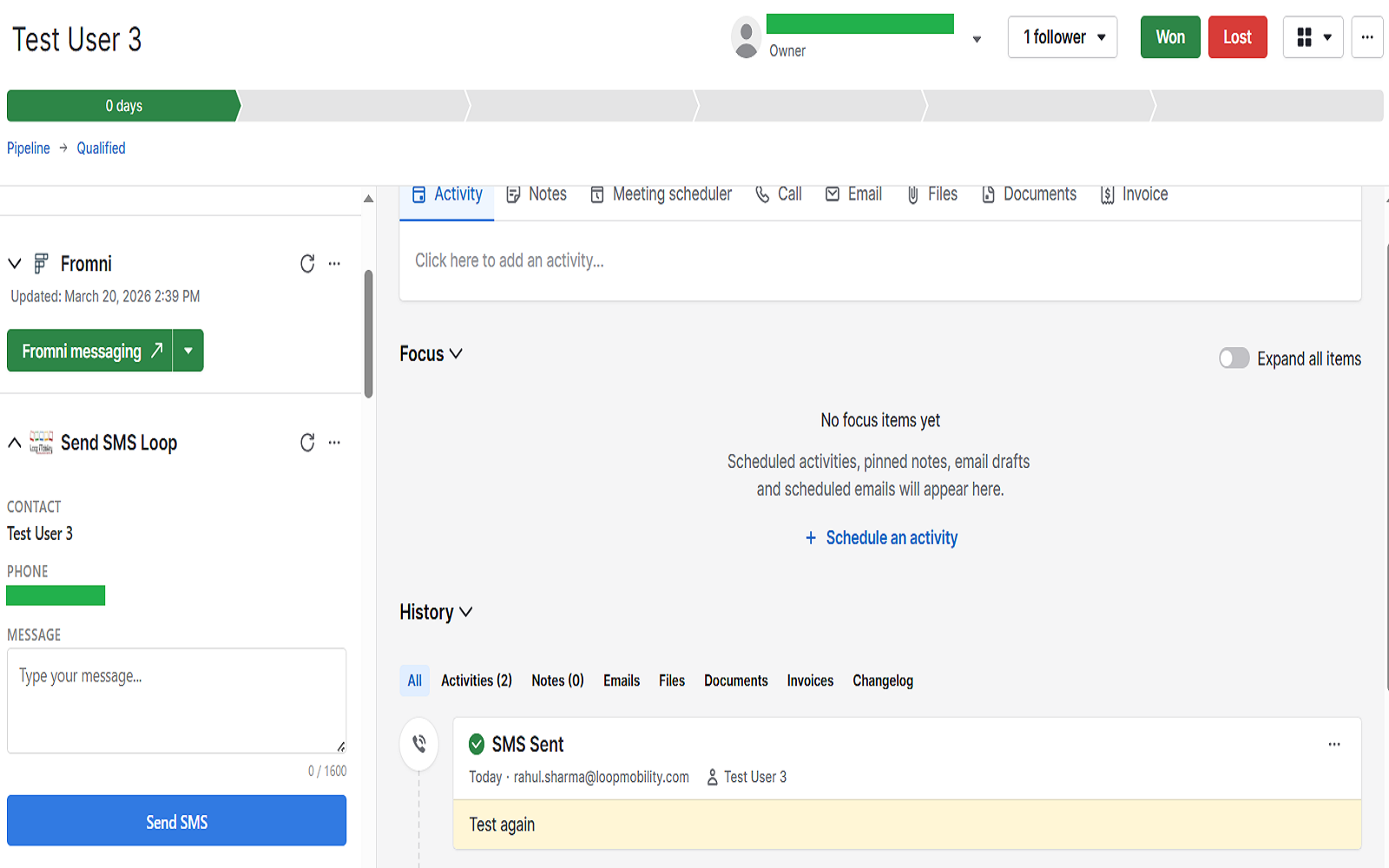
Send SMS from Deals, Contacts, and Organizations, and keep every conversation automatically logged within Pipedrive.
Key Features
• Send SMS directly from contact, deal, and organization views • Real-time messaging without switching tools • Automatic logging of messages in Pipedrive timeline • Personalized messaging using customer data • Centralized communication for better tracking
Why Use Loop Mobility SMS
Sales teams often rely on external messaging tools, leading to scattered conversations and missed follow-ups. Loop Mobility solves this by centralizing communication inside Pipedrive.
This improves response time, increases visibility, and helps teams close deals faster.
Compliance
Users must ensure they have proper consent before sending SMS messages. Loop Mobility does not support unsolicited or spam messaging.

Panels
Instantly see and interact with Loop Mobility SMS - Australia as you dive into the details of your deals/contacts in Pipedrive.
Send SMS Loop
Locations:deal detailsorganization detailsperson details
Send one-to-one SMS messages to contacts directly from Deals, Leads, and People in Pipedrive.
Before installing, ensure you have:
1. Create Your Loop Mobility Account Visit: https://sms.loopmobility.com/ Sign up, verify your email, complete onboarding, and add your sender ID.
2. Generate API Credentials Go to API Settings → Developer Options Generate your API Key & Secret and copy them.
3. Install the App in Pipedrive Go to Tools & Apps → Marketplace Search "Loop Mobility SMS" Click Install and authorize access
4. Connect Your Account Enter API credentials and save
5. Configure Access Admins can enable access for selected users
6. Send Your First SMS Open a Contact/Deal → Click "Send Loop Mobility Message" Type message → Send
To uninstall Loop Mobility SMS from Pipedrive:
After uninstalling:
For a visual walkthrough of the uninstall process, watch this video: https://www.youtube.com/watch?v=_kOVdSgh5UY
If you’re interested in this app, you might also like:


Use our powerful API to build awesome apps for either your company or for all Pipedrive users.
Build an app