Integrace e-mailu s CRM
Sledujte každou konverzaci pomocí softwaru Pipedrive pro integraci e-mailu s CRM
Integrace e-mailu s CRM propojuje vaši doručenou poštu se zákaznickými daty, takže prodejní konverzace, historie kontaktů i aktualizace dealů zůstávají na jednom místě.
Dobrý CRM software s funkcemi e-mailové integrace a automatizací procesů znamená žádné přepínání mezi nástroji, žádné ruční zaznamenávání e-mailů a žádnou ztrátu kontextu.
E-mailová integrace Pipedrive propojí každý e-mail se správným kontaktem a dealem, takže máte vždy úplný přehled o tom, co se u leadu děje.
Plný přístup. Není vyžadována kreditní karta.
Důvěřuje mu více než 100 000 společností ze 179 zemí


Co je integrace e-mailu s CRM?
Integrace e-mailu s CRM propojí váš e-mailový účet s platformou pro řízení vztahů se zákazníky (CRM). Místo přepínání mezi doručenou poštou a nástrojem CRM můžete sledovat konverzace, synchronizovat kontaktní údaje a spravovat následné kroky na jednom místě.

Spravujte konverzace pomocí softwaru Pipedrive pro e-mailovou integraci
Udržujte prodejní komunikaci organizovanou pomocí CRM softwaru s e-mailovou integrací, vytvořeného pro vytížené týmy.
Synchronizujte e-maily s kontakty a dealy, abyste měli přehled o každé interakci se zákazníkem
Vytvářejte a odesílejte e-maily v Pipedrive pomocí přizpůsobitelných šablon
Sledujte otevření a kliknutí v reálném čase a lépe porozumějte výkonu e-mailů
Funkce e-mailové integrace Pipedrive


Na co se zaměřit u CRM softwaru s e-mailovou integrací
Nejlepší CRM s e-mailovou integrací by mělo zjednodušovat komunikaci. Hledejte tyto funkce:
Jednoduché nastavení. Rychle připojte běžné poskytovatele e-mailu, jako jsou Gmail a Outlook, bez zdlouhavého technického procesu.
Obousměrná synchronizace. Udržujte e-maily a historii konverzací sladěné napříč doručenou poštou a CRM.
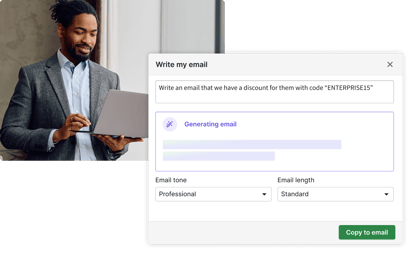
Integrovaná asistence při psaní e-mailů. Získejte přehled o sentimentu zákazníků a rychle vytvářejte zprávy, které odpovídají vaší značce.
Nástroje pro automatizaci procesů. Spouštějte následné kroky a další automatizované e-mailové sekvence a šetřete čas.


Jak nastavit e-mailovou integraci v Pipedrive
Nastavte integraci e-mailu s CRM v pěti snadných krocích:
Plně synchronizujte svou e-mailovou schránku
Pokud jsou vaše e-mailová data v samostatných nástrojích, váš tým ztrácí čas hledáním kontextu a ruční aktualizací záznamů.
Dobrá integrace e-mailu s CRM by měla automaticky vtahovat konverzace do vašeho prodejního procesu bez ručního zadávání dat.
S e-mailovou integrací Pipedrive můžete propojit svou doručenou poštu a udržovat e-maily připojené ke správným kontaktům a dealům.
Zjistěte více o synchronizaci e-mailů v Pipedrive.


Kopírujte do CRM jen důležitá e-mailová vlákna
Ne každý tým chce synchronizovat celou doručenou poštu jen proto, aby měl klíčové e-maily v systému CRM.
Flexibilní e-mailová integrace vám umožňuje přidávat konkrétní e-mailová vlákna k dealům, aniž by měnila způsob práce vašeho týmu.
Se Smart Bcc od Pipedrive můžete e-mailová vlákna ručně kopírovat do doručené pošty Pipedrive a propojovat je se správnými dealy nebo kontakty.
Zjistěte více o Smart Bcc.
Zobrazte každou konverzaci v kontextu
Když prodejci nevidí úplnou historii e-mailů, odpovědi jsou pomalejší a méně informované.
Propojené CRM by mělo usnadnit vyhledání každé konverzace a následné kroky.
Pipedrive zobrazuje historii e-mailů v zobrazeních kontaktů a dealů, takže váš tým získá úplný přehled ještě před oslovením.
Podívejte se, jak komplexní CRM Pipedrive udržuje zákaznickou komunikaci organizovanou.


Šetřete čas pomocí přizpůsobitelných e-mailových šablon
Psaní stejných e-mailů stále dokola zabírá čas a snižuje konzistentnost vašeho oslovování.
E-mailové šablony pomáhají vašemu týmu postupovat rychleji a zároveň udržovat sdělení jasná a opakovatelná.
S Pipedrive můžete používat připravené šablony a odesílat profesionální e-maily, aniž byste každou zprávu začínali od nuly.
Zjistěte více o e-mailových šablonách Pipedrive.
Zjistěte, které e-maily získávají pozornost
Bez přehledu o otevřeních a kliknutích je těžší zjistit, kdy je lead zapojený.
Sledování e-mailů pomáhá vašemu týmu navazovat kontakt ve správný čas a upřednostňovat slibnější konverzace.
Sledování e-mailů v Pipedrive zobrazuje oznámení o otevřeních a kliknutích v reálném čase, takže prodejci získávají užitečné signály, na které mohou rychle reagovat.
Prozkoumejte funkce e-mailové analytiky a reportů v Pipedrive.


Posílejte e-maily ve správný čas, pokaždé
Při prodeji ve velkém může ruční odesílání každého e-mailu nebo následného kroku vést k nekonzistentnímu nebo neefektivnímu načasování.
Plánování a automatizace pomáhají týmům odesílat zprávy v ideální čas bez shonu na poslední chvíli.
S Pipedrive můžete plánovat e-maily předem a automatizovat následné kroky na základě konkrétních akcí, takže prodejci zůstávají konzistentní, šetří čas a nikdy neztratí tempo.
Zjistěte více o funkcích automatizace e-mailů v Pipedrive.
Jak Pipedrive pomohl společnosti NJ Media zkrátit prodejní cyklus
Společnost NJ Media používala k získávání nových leadů standardní hromadné e-maily. Malý tým měl pocit, že jeho oslovování postrádá osobní přístup.
Po synchronizaci Mailigen a Pipedrive za účelem odesílání sledovatelných a personalizovaných e-mailů zkrátili prodejní cyklus z průměrných 40 dnů na pouhých 11 dnů.
„Teď používám Pipedrive a život bez něj by byl těžký.“
Přečíst případovou studii
Otevře se v novém okně
Zdokonalte svou e-mailovou strategii s Campaigns
Campaigns by Pipedrive je doplněk pro e-mailový marketing, který vám pomáhá vytvářet, odesílat a sledovat profesionální e-mailové marketingové kampaně pomocí zákaznických dat, která už ve svém CRM máte.
Obsahuje:
Drag-and-drop editor e-mailů. Vytvářejte profesionální e-mailové kampaně rychleji pomocí přizpůsobitelných šablon.
E-mailová segmentace. Seskupujte kontakty podle dat v CRM pro personalizované e-maily a relevantní cílení.
E-mailová analytika a reporty. Sledujte otevření, kliknutí a další e-mailové metriky v reálném čase.
Synchronizace s CRM. Využívejte stávající informace o zákaznících, aby byly kampaně včasné a relevantní.
Zjistěte více o Campaigns by Pipedrive.
