Pipedrive's beta program
Be the first to try what’s next!
With one opt-in, you and your company’s users automatically get access to current and upcoming beta releases. Try new features before wider rollout, then suggest improvements and flag issues so we can make them more useful for your team.
Current beta features

AI email summarization
Pipedrive's AI email summarization turns long emails into short, clear summaries, so you can quickly understand the essentials. It helps you save time, reduce inbox overload and make faster, better-informed decisions.
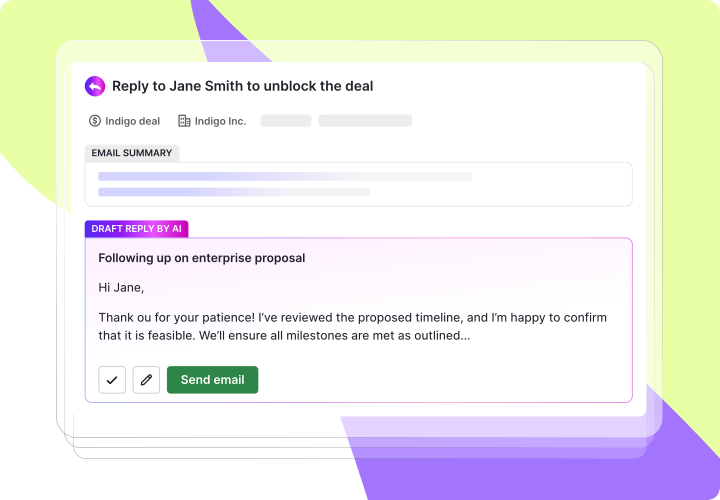
AI email suggested replies
Generate relevant, engaging replies based on the conversation so you can respond quickly and effectively. It turns minutes of writing into seconds while improving the quality and relevance of every response.
What's next?
We’ll keep this page updated as new beta features roll out. For the latest features and improvements already live in Pipedrive, visit our Product updates page.

Why join?

Get early access
Try current beta features and automatically get access to upcoming releases.

Help shape the product
Share feedback and insights that influence what we improve, build and release next.

Make your feedback count
Suggest improvements and flag issues so we can make beta features more useful.
Beta releases are experimental, subject to change and may be discontinued based on feedback.

How the program works
One opt-in for all beta features
Once you join, your company will be enrolled in current and upcoming beta releases – there’s no need to opt in feature-by-feature. Only users with access to account settings can manage beta access for the company.
Get access automatically
Beta features are enabled automatically. We’ll let you know about new releases by email or in-app messages. Some beta features may require a specific billing plan or additional setup.
Manage access anytime
Turn individual beta features off, opt out of the beta program entirely or rejoin at any time.
How to get started

Open the beta program page from the account menu in the top-right corner of Pipedrive, under Company settings or go there directly using this link.


Click Join beta program to enable beta access for your company. Once enabled, beta features will be rolled out automatically to your account.
If you don’t have access to account settings, you can notify a user who does from the beta program page, so they can review and enable the beta program for your company.
