
Logic model templates are good frameworks for program managers who need structure and clarity. They’re used across various sectors to simplify planning and evaluation, ensuring every effort aligns with key objectives.
In this guide, you’ll learn what a logic model template is and how to create one. We’ll also walk through some logic model examples and give you access to a ready-to-use template for planning your own projects.
What is a logic model?
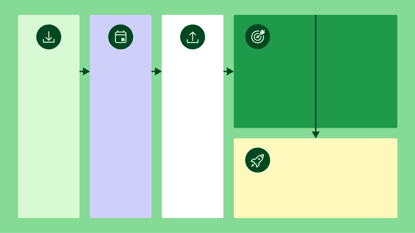
A logic model is a visual tool for illustrating the relationship between a program’s resources, activities and desired outcomes.
Think of it as a visual roadmap showing the cause-and-effect relationships between each program phase. Mapping out each part of your program in a clear, logical sequence makes planning and evaluation easier.
A logic model is beneficial when launching a new long-term initiative with many moving pieces and multiple stakeholders.
For example, a B2B SaaS business may want to develop a sales training program. The company sets a sales goal of increasing conversions by training its sales team in communication skills and objection-handling techniques.
A logic model template for the project would include the following information.
Inputs: Budget, training materials, coaches, time investment
Activities: Role-playing exercises, workshops, one-to-one coaching sessions
Outputs: Number of training sessions completed, percentage of reps trained, engagement levels
Short-term outcomes: Improved sales confidence and increased lead follow-ups
Long-term outcomes: Higher sales conversion rates and increased revenue
A logic model is an easy-to-use framework that doesn’t involve complicated design, such as a critical path analysis or work breakdown structure. Instead, all the components can be recorded in a simple template like this one:

This method of breaking down the program makes it easier for stakeholders to evaluate it, track progress and measure success.
Logic model template
We’ve created two ready-to-use logic model templates. If you’re a more text-based planner and collaborator, use the logic model template for Google Docs. For a more visual approach, try the template for Google Slides.
You can also easily convert them if you need a logic model template for Word or PowerPoint.
Download your Google Docs Logic Model Template
What are the key parts of a logic model template?
A logic model comprises several key components, including inputs, activities, outputs, outcomes, external factors and relationships.
It’s more than just a visual project management tool, as each part plays a critical role in improving clarity, guiding decision-making and measuring impact.
Here’s how the components work together:
Project phase | Definition and example |
Inputs | The resources needed to implement the program, such as funding, personnel, equipment and time. Example: A non-profit needs grant funding and volunteers to run a community education program. |
Activities | The specific actions taken to achieve the program’s goals, like training sessions, workshops or outreach initiatives. Example: A software company conducts cybersecurity training for employees. |
Outputs | The immediate, measurable results of activities, such as attendance numbers, distributed materials or completed reports. Example: A financial services firm hosts 10 investment strategy webinars with 500 attendees each. |
Outcomes | The changes or impacts resulting from the program categorized into short-term, medium-term and long-term outcomes. Example: Improved manufacturing processes lead to higher profitability and sustainability over a set period. |
External factors | Outside influences that can affect the program’s success, such as economic conditions or policy changes. Example: Interest rate changes impact the effectiveness of new investment strategies. |
Cause-and-effect relationships | The logical connections between inputs, activities, outputs and outcomes that show how each part leads to the next. Example: Implementing AI-powered customer support (input) leads to faster response times (activity), which increases customer satisfaction scores (output) which results in higher customer retention (outcome). |
Understanding how these elements work together can help you create a logic model that documents and measures your program’s impact and success.

How to create an effective logic model
Creating a logic model requires careful planning and collaboration. Establishing your project baseline can improve your chances of success and achieve your program’s goals.
Here’s a step-by-step guide for creating your own logic model template:
1. Define the program’s goals
Like a GPS needs a destination, your logic model requires a clear business goal.
Defining your goals will give your logic model a strong foundation, ensuring that every action you take aligns with your desired outcomes.
For small teams, this means getting everyone on the same page about the program’s core purpose. Since resources are often limited, having a well-defined goal helps you focus efforts where they’ll have the most impact.
Use the SMART framework (Specific, Measurable, Achievable, Relevant, Time-bound) to ensure your goals are actionable targets.

For example, a marketing agency might outline an expansion goal as follows:
“Support increased marketing efforts by scaling our paid media team from 2 to 6 specialists by Q3 2025.”
Defining your program’s goals in this way ensures that your logic model stays focused, actionable and results-driven.
2. Identify stakeholders
Once you’ve defined your goals, the next step is determining who will be involved in the program.
A well-planned logic model requires input from key stakeholders, i.e., the people who have a direct role in the program. Identifying them from the outset ensures greater alignment and smoother execution.
However, it’s important not to involve too many people. Bringing in people with little influence or involvement can slow decision-making down.
Who to include:
Internal stakeholders: team members, leadership, program managers
External stakeholders: clients, agencies, funders
Who not to include:
Individual contributors who don’t impact the program’s strategy or implementation
Teams with no stake in the outcomes
Your logic model is only as strong as the support behind it. Identifying and engaging key stakeholders fosters a shared understanding and ensures that your program has the backing, resources and alignment needed for success.
Note: In the template we provided, stakeholders can be listed in the Participation column under the Output section.
3. List the inputs
Now that you’ve defined your goals and identified key stakeholders, it’s time to outline the inputs.
Inputs are the resources required to implement your initiative successfully. They can include time, money, personnel, tools, data or even partnerships. Defining inputs early can ensure teams maximize impact without overextending capacity.
Here’s how to determine your inputs:
Identify essential resources. Think about what’s required to launch and sustain the program. For example, if you’re implementing a lead nurturing initiative, your inputs might include personnel, technology, budget, data and time.
Assess what you already have. Small teams operate with limited resources, so identify what’s readily available.
Identify gaps and constraints. If there are resource gaps, now is the time to identify where. For example, if you lack in-house expertise, you might need external consultants or additional training.
Prioritize based on impact. Not all inputs are equally critical. Focus on the must-haves that contribute to your program’s success, then explore nice-to-have resources if capacity allows.
Take time to document all required inputs. Identifying what’s available and what’s missing helps you make informed decisions and set realistic expectations about program outcomes.
Tip: The MoSCoW prioritization technique is a helpful way to prioritize tasks or requirements. Teams can create a roadmap for which items to address first, from must-have items to lower-priority tasks.
4. Outline the activities
Program activities are the specific tasks your team will complete using the inputs you listed. Mapping inputs and activities to outcomes gives team members clarity on their responsibilities and helps them stay aligned.
Note: In the template we provided, Activities can be found under the Output section.
In our lead nurture example, activities might include:
Creating a segmented lead list based on engagement levels
Setting up a drip email marketing sequence in your CRM
Training sales reps on the new follow-up process
Tracking responses and adjusting outreach based on engagement
Tip: Setting a timeline can help keep the project moving forward. Without timelines, activities are at risk of slowing down or missing deadlines. Timelines make it easier for everyone to stay in the loop on project progress.
5. Set desired outcomes
Outcomes define the broader impact of your program. These can be divided into short-term, medium-term and long-term outcomes, showing how your initiative drives meaningful change.
Short-term outcomes. These are the changes to expect within a few months of implementation, like team adoption of the new process or higher response rates from lead nurture emails.
Medium-term outcomes. These are behavioral changes to expect after a year or two, such as sales reps following up on leads more consistently or better collaboration between marketing and sales.
Long-term outcomes. These are the big-picture outcomes that define your program's ultimate success, such as greater revenue from the optimized sales process or time saved from more efficient sales workflows.
Clearly defining short-term, medium-term and long-term outcomes allows your program to be goal-driven and results-oriented. Tracking these over time helps you measure success and refine your approach as needed.
Note: Splitting outcomes into timeframes gives you more agility to address problems as they arise. For example, if you missed your short-term outcome of increasing lead nurture email engagements, you can review and adapt relevant activities before you get too far down the line.
6. Consider external factors
Even the best-designed logic model doesn’t operate in a vacuum. External factors like economic conditions, industry trends or customer behaviors influence a program’s success. Considering these factors helps companies plan better.
For instance, if a SaaS company launches a new pricing model during a period of high budget constraints, it may need to offer flexible payment plans or a discounting strategy to maintain sales momentum.
Here’s how to factor external factors into your logic model:
Identify potential risks. Think about external conditions that could impact your program. Examples might include an economic downturn affecting customer spending or new regulations impacting outreach strategies.
Plan for different scenarios. Consider best-case, worst-case and most likely outcomes so your team can adjust as needed.
Stay agile. Regularly review external factors and adapt your approach when necessary. Use market data, customer feedback and industry insights to stay ahead of changes.
These external factors are even more important for small teams. Adapting quickly can be challenging with limited resources, so being proactive and identifying potential risks helps teams stay agile and informed.
Tip: Conduct market research regularly. Tracking trends early helps you adapt before they become roadblocks.
7. Validate the model
Before fully implementing your logic model, it’s essential to validate it with stakeholders. Checking in advance enables your team to catch potential gaps early and strengthen buy-in from those involved.
Present your model to key stakeholders and get feedback from team members. Their insights help you sense-check whether the goals are realistic and achievable, if there are any missing resources or roadblocks and if the activities align with business priorities.
For example, a sales leader reviewing a lead nurture program may notice that the timeline is too short, given the typical sales cycle. A marketing manager may also see that the segmentation criteria are too broad. Addressing these problems before launch saves time and prevents roadblocks later.
Once you have feedback, you can refine the model before implementing it. This will guarantee that your model is practical and effective.
8. Implement and track progress
Once your logic model has been validated by stakeholders and finalized, it’s time to put it into action. But implementation isn’t just about executing the plan. It’s about tracking progress, analyzing results and making continuous improvements.
The best way to track progress is to schedule regular check-ins with stakeholders. Create a project report that allows you to review task statuses, identify blockers and get feedback on the project’s progress.
Your template should serve as the source of truth for your project report. Ensure the discussions focus on the activities, metrics and goals outlined in the plan.
For example, suppose your goal is to increase customer retention by 15% over six months. In that case, you’d review engagement and customer churn data in your team meeting. You would also discuss whether initiatives like onboarding or outreach are making an impact.
Tip: Track both leading and lagging indicators. Leading indicators (like email engagement rates or customer support response times) give early signals of success. Lagging indicators (like retention rates or revenue growth) show the long-term impact of your efforts. Keeping an eye on both helps you make proactive adjustments before minor issues become major setbacks.
A practical example of a logic model template
To help you understand how a logic model template works, let’s walk through each section with a real-world example.
This example outlines how a boutique digital agency can structure and measure a blog-driven lead-generation campaign to attract and convert potential clients.
Project phase | Example |
Inputs | Blog writers, SEO tools, content management system (CMS), keyword research, design resources |
Activities | Writing and publishing blog posts, optimizing for SEO, promoting content on social media, building backlinks |
Outputs | Number of blog posts published, search ranking improvements, website traffic growth |
Participation (stakeholders) | Content team (writers, editors, designers), marketing manager, SEO specialist, social media manager |
Short-term outcomes | Increased website visits, higher engagement on blog posts, more time spent on the site |
Medium-term outcomes | More newsletter sign-ups, increased inbound leads, improved search rankings |
Long-term outcomes | Higher conversion rates, increased revenue, stronger brand authority in the industry |
External factors | Google algorithm updates, industry competition, shifts in consumer search behavior |
Cause-and-effect relationships | Publishing valuable blog content (input) improves search rankings (short-term outcome), leading to more inbound leads (medium-term outcome), resulting in increased conversions and revenue (long-term outcome) |
Using a logic model template to outline this strategy ensures that everything included has a clear purpose. It also makes it easier to track progress and adjust if certain parts of the strategy are not working out. However, it’s not the only framework you can use to measure success.
Download Your Guide to Sales Performance Measurement
Logic model vs. OKR framework
Choosing the right planning framework depends on your company’s goals and way of operating.
Logic models are best for long-term planning to ensure each input and activity matches the long-term outcome.
OKRs (Objectives and Key Results), on the other hand, are better for fast-moving businesses using agile project management and execution techniques.
Understanding the strengths of each model and the differences between the two can help you decide which framework best fits your needs:
Logic model | OKR |
Purpose: Emphasize program planning and evaluation, showing how resources and activities lead to desired outcomes | Purpose: Focus on goal-setting and performance tracking, helping teams stay aligned and accountable for business objectives |
Structure: Depict cause-and-effect relationships, often using a flowchart to connect inputs, activities, outputs and outcomes | Structure: Follow a structured format including an objective (a clear, ambitious goal) paired with key results (specific, measurable outcomes that define success) |
Use case: Long-term planning, particularly in nonprofits, public programs and complex initiatives where measuring impact over time is essential | Use case: Agile business execution that allows organizations to set and adjust priorities quarterly and drive rapid progress |
Both models serve specific purposes. Which is right for you depends on your organization’s goals, timeline and need for flexibility.

Pros and cons of a logic model
Logic models offer a structured way to plan, execute and evaluate programs. However, they’re not without their challenges.
Logic models need a lot of upfront planning, and their cause-and-effect structure can make them less adaptable than an OKR framework. They provide clarity and accountability but may not be the best fit for agile teams.
Here are some factors to consider:
Pros
Provides a clear visual roadmap for planning
Helps with stakeholder alignment and decision-making
Supports program evaluation and accountability
Helps to identify cause-and-effect relationships
Cons
Can oversimplify complex programs
Requires regular updates as programs evolve
Some teams may find it too rigid for dynamic projects
Developing an effective model can be time-consuming
Understanding these trade-offs can help you determine whether a logic model is the right fit for your organization or whether you should look into an alternative.
How to create a logic model template with Pipedrive
While using a simple Word or PowerPoint logic model template is one option, another is using a customer relationship management (CRM) system like Pipedrive.
While Pipedrive is geared toward sales and marketing, its customizable features make it a powerful tool for building and managing a logic model.
Here’s how to create a logic model template in Pipedrive.
1. Set up a pipeline to represent your logic model
Pipedrive’s pipeline management feature is perfect for visualizing each stage of your logic model. To create one, navigate to the Pipelines section and click Add new pipeline.
Then, create stages that align with your logic model’s key components: Inputs, Activities, Outputs and Outcomes.

For a more detailed breakdown, consider adding sub-stages (e.g., Short-Term, Medium-Term and Long-Term Outcomes).
2. Use custom fields to track important data
Custom fields allow you to record specific details about each stage of your logic model.
Go to “Settings > Data fields” and add fields to track budget, resources, key activities and measurable outputs.

3. Automate progress tracking with workflow automation
Pipedrive’s workflow automation features can help track progress and ensure smooth execution.
You can set up automated task reminders for key activities (e.g., sending follow-up reports or scheduling training sessions).
Use deal stage automation to move initiatives forward when milestones are met (e.g., automatically shifting a program from “Activities” to “Outputs” when training sessions are completed).

4. Monitor impact with reporting and dashboards
Pipedrive’s built-in dashboards and reports help you measure the success of your program.
Create custom reports to track key performance indicators (KPIs), such as program completion rates or stakeholder engagement.
You can also use visual charts to identify trends and adjust strategies as needed.

5. Collaborate with stakeholders in real-time
With Pipedrive’s shared pipelines and activity and goals features, teams can work together seamlessly.
Assign responsibilities to specific team members for different activities.
Use comments and activity logs to keep stakeholders informed on progress.

Using Pipedrive’s pipelines, custom fields and automation capabilities lets you streamline program planning and evaluation while ensuring every step aligns with your desired outcomes.
Final thoughts
Creating an effective logic model template can be the difference between a successful program and wasted resources.
Sign up for Pipedrive’s 14-day free trial to test out building your logic model template. See how automation, tracking and collaboration can streamline your planning process.