Pipedrive vs. Prospect CRM
Choose a flexible and powerful CRM that adapts to sales teams in all industries.

Pipedrive
Pipedrive is the sales-first CRM that helps teams in any industry scale faster – without the complexity of ERP systems or stock management tools.
Prospect CRM
Prospect CRM focuses specifically on B2B product sales ERP/accounting systems, making it less adaptable for broader or service-based companies.
Why is Pipedrive the best Prospect CRM alternative?


Pipedrive vs. Prospect CRM – a snapshot
While Prospect CRM supports only B2B product sales, Pipedrive helps all industries customize pipelines, learn from in-depth insights and build a better customer experience (CX) at scale.
Pipedrive
Prospect CRM
Feature
Free trial
Instant free trial
Depends on ERP integration
Billing
Monthly and annually
Annual only, 12–36 month terms
Pre-sales tools
Nurturing sequences, data enrichment, lead scoring, lead routing
Focus on sales and post-sales
Customers
100,000+
5,000+
Visual pipeline management
Drag-and-drop Kanban pipelines, highly flexible
Kanban view, limited
Intuitive interface
Easy to onboard and use instantly with no steep learning curve
Onboarding training necessary
Integrations
Hundreds of apps (from social media to predictive analytics) and an API
Limited number of apps
Analytics and reporting tools
Custom dashboards, broader reporting options and sales forecasting
Built-in dashboards and standard reporting tailored to B2B product sellers
Built-in marketing tools
Group emailing, templates and email automations included. Marketing automations available as add-ons.
N/A
Mobile app
User-friendly iOS (iPhone and iPad) and Android versions
Unavailable to download via the App Store or Google Play Store
Customization options
Easily customizable for any workflows and industries
Focused on very specific industry niches
Customer support
Multiple channels (including phone support) and 24/7 access for higher plans
Limited times on weekdays
Migrate data from your old CRM in minutes using Import2
Disclaimer: All information, prices and data were last verified on 24 November 2025. To report any incorrect or outdated information, please get in touch with us. For more information on Pipedrive features and costs, check out our pricing page. To compare Pipedrive to other CRMs, visit our Comparison Hub.


Build your own tailored sales pipelines
When salespeople track deals through spreadsheets or scattered tools, opportunities can slip through the cracks.
With all pipeline stages visible in one place, teams can spot bottlenecks and prioritize revenue-driving actions.
Use Pipedrive’s customizable, drag-and-drop pipelines to manage deals efficiently and increase close rates.
Learn more about Pipedrive’s sales pipeline management.

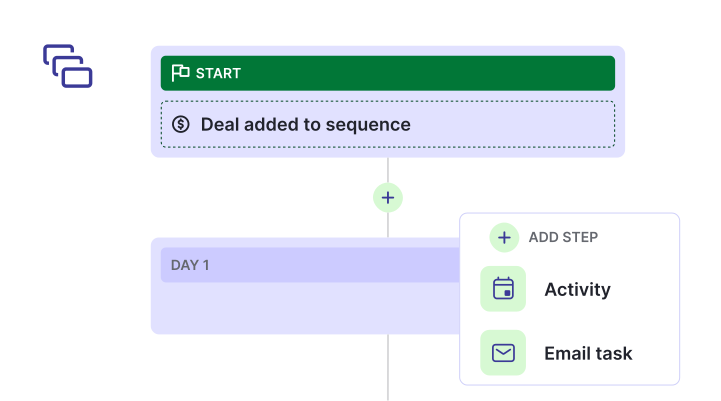
Streamline complex workflows in any industry
Managing repetitive tasks and multi-step processes slows down sales and creates room for errors.
Centralizing tasks, reminders and follow-ups ensures consistency and frees up teams to focus on high-value activities.
Pipedrive helps you optimize workflows with automation, custom rules and clear task tracking.
Learn more about Pipedrive’s CRM workflows.
How Pipedrive helped Ari Motors GmbH increase sales 10x
Electric commercial vehicle supplier Ari Motors GmbH was struggling to handle a growing volume of customers and deals.
By building 30 custom pipelines and automations in Pipedrive, the company increased lead inquiries and sales tenfold.
“We currently work with 30 different pipelines [that] provide transparency and structure, making it easier for all parties involved in the process to maintain an overview and drive deals forward.”
